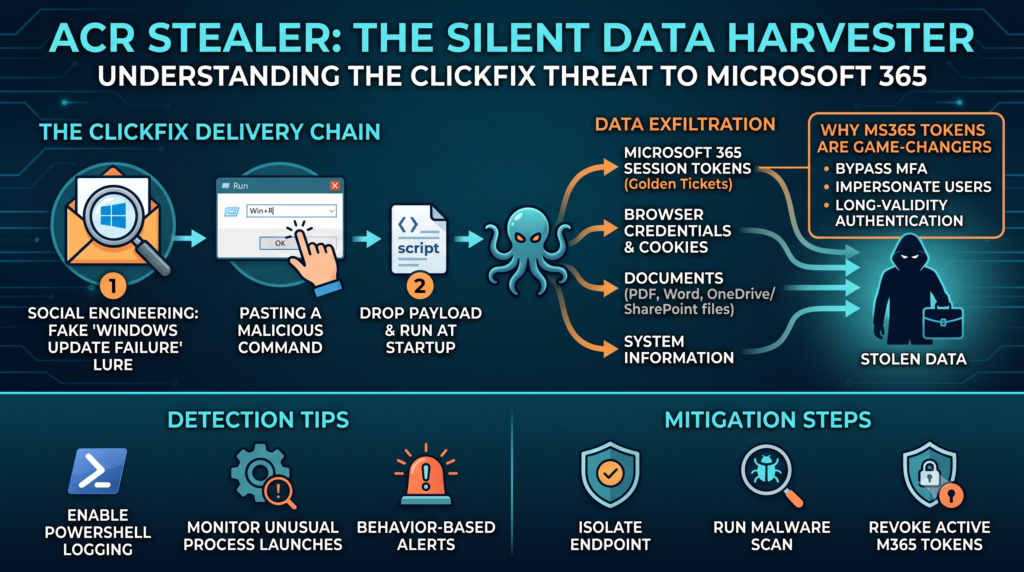
Hey there, fellow cyber‑curious! If you’ve been keeping an eye on the latest threat reports, you’ve probably heard the name ACR Stealer buzzing around security forums and newsletters. This isn’t just another run‑of‑the‑mill malware—it’s an infostealer that’s been quietly slipping out of corporate networks since early 2024, grabbing everything from saved browser passwords to live Microsoft 365 session tokens. In today’s post, I’m going to unpack how ACR Stealer works, why the ClickFix lures are so effective, and what you can do right now to protect yourself and your organization.
What Exactly Is ACR Stealer?
ACR Stealer is a modular infostealer that targets Windows environments, especially those that rely heavily on Microsoft 365 services. Its primary goal is data exfiltration: it harvests credentials, session cookies, PDF files, and even documents stored in OneDrive or SharePoint. What makes it stand out is its ability to stay under the radar for weeks, silently copying files while the victim continues to work as usual.
How the Malware Gets Inside – The ClickFix Delivery Chain
The most common infection vector, as detailed by Microsoft’s Defender Experts team, starts with a deceptively simple user action: pasting a command into the Windows Run dialog (Win+R) and hitting Enter. The command points to a malicious script hosted on a compromised or spoofed website that pretends to be a legitimate ClickFix utility. ClickFix is a real tool used for troubleshooting Windows updates, so attackers exploit the name’s familiarity to lure users.
- Step 1 – Social engineering: An email or chat message claims that a critical Windows update has failed and offers a ClickFix fix.
- Step 2 – Command execution: The victim copies a
powershellorcmdline that silently downloads a payload. - Step 3 – Payload drop: The script drops the ACR Stealer binary into a hidden directory and registers it to run at startup.
- Step 4 – Data collection: Once active, the stealer begins scanning browsers, Office apps, and synced cloud folders for valuable data.
Because the initial command looks innocuous and the ClickFix name is trusted, many users don’t pause to verify the source. That’s the sweet spot for the attacker.
What Data Does ACR Stealer Actually Grab?
Once inside, ACR Stealer goes on a data‑hunting spree. Here’s a non‑exhaustive list of what it can steal:
- Browser credentials: Saved passwords, cookies, and session tokens from Chrome, Edge, Firefox, and even legacy Internet Explorer.
- Microsoft 365 tokens: Live authentication tokens that allow attackers to impersonate users in Outlook, Teams, and SharePoint without needing the actual password.
- Document files: PDFs, Word, Excel, and PowerPoint files stored locally or synced via OneDrive/SharePoint.
- OneDrive and SharePoint sync data: Any file that has been synchronized to the cloud, even if the original is deleted from the local machine.
- System information: OS version, installed software, and network configuration that helps the attacker map the environment.
In short, the malware doesn’t just steal passwords—it steals the keys to the kingdom, allowing threat actors to move laterally across an organization with minimal friction.
Why the Microsoft 365 Tokens Are a Game‑Changer
Most people think that if a password is compromised, the damage stops there. Not with ACR Stealer. By extracting live session tokens, the malware gives attackers a way to bypass multi‑factor authentication (MFA) that would normally protect a user’s account. These tokens are essentially “golden tickets” that let the attacker act as the legitimate user for the duration of the token’s validity—often several hours or even days.
From a defender’s perspective, this means that traditional password‑reset procedures may not be enough. You need to invalidate the stolen tokens, which usually requires a forced sign‑out from all sessions or a tenant‑wide token revocation, both of which can be disruptive.
Real‑World Impact – What Organizations Are Seeing
Since its emergence, ACR Stealer has been spotted in a variety of sectors, from finance to healthcare. The most common symptoms reported by IT teams include:
- Unexplained spikes in outbound traffic to obscure IP ranges.
- New, unknown files appearing in
C:\ProgramDataor hidden user folders. - Multiple user accounts showing simultaneous logins from geographically disparate locations.
- Encrypted PDF exfiltration attempts detected by DLP solutions.
In one notable case, a mid‑size law firm discovered that the attacker had accessed confidential client contracts stored in SharePoint, potentially exposing privileged information to competitors.
How to Detect ACR Stealer Early
Early detection is the best defense. Here are some practical steps you can take right now:
- Enable PowerShell logging: Turn on
ScriptBlockLoggingandModuleLoggingto capture suspicious command lines. - Monitor for unusual process launches: Look for
cmd.exeorpowershell.exespawning from theRundialog without a user‑initiated GUI. - Set up behavior‑based alerts: Use EDR tools to flag rapid enumeration of browser credential stores or OneDrive directories.
- Inspect network traffic: Flag outbound connections to known malicious domains or IPs associated with the ClickFix lure.
- Review token usage: Azure AD sign‑in logs can reveal token‑based authentications that originate from unexpected devices.
Many of these controls are already part of Microsoft Defender for Endpoint and Azure Sentinel, so if you have those in place, you’re a step ahead.
Mitigation – What You Can Do Right Now
If you suspect an infection, act quickly:
- Isolate the endpoint: Disconnect it from the network to stop data exfiltration.
- Run a full malware scan: Use a reputable antimalware solution that can detect ACR Stealer’s known hashes.
- Revoke all active Microsoft 365 tokens: In the Azure portal, go to Sign‑ins → Revoke sessions for affected users.
- Force password resets: Even though tokens are the bigger issue, resetting passwords removes one attack vector.
- Audit privileged accounts: Ensure that no admin accounts were compromised and that MFA is enforced on all high‑value users.
- Educate users: Remind staff that typing commands into the Run box should be reserved for trusted scripts only.
After remediation, conduct a post‑incident review to understand how the lure got through your defenses and adjust your security policies accordingly.
Long‑Term Strategies to Keep ACR Stealer at Bay
Beyond the immediate response, consider these longer‑term measures to harden your environment against similar threats:
- Application whitelisting: Use Windows Defender Application Control (WDAC) or similar tools to only allow approved executables to run.
- Zero‑trust network access: Segment critical workloads and require continuous verification before granting access.
- Secure browser extensions: Deploy policies that block unauthorized extensions, which can be used to exfiltrate cookies.
- Regular token rotation: Set shorter lifetimes for Azure AD tokens and enforce periodic re‑authentication.
- Threat‑intelligence feeds: Subscribe to feeds that include IOCs (Indicators of Compromise) for ACR Stealer and related ClickFix lures.
By layering these controls, you create multiple hurdles that make it far less likely for an attacker to succeed.
Final Thoughts – Stay Curious, Stay Safe
What I love about the cybersecurity world is that there’s always something new to learn, and ACR Stealer is a perfect reminder that attackers are constantly evolving their tactics. The ClickFix lure shows how a tiny piece of social engineering—just a command in the Run box—can open the floodgates to massive data loss.
My takeaway? Combine technical safeguards with a culture of curiosity. If something feels off—whether it’s an unexpected pop‑up, a strange command line, or an email asking for a “quick fix”—take a moment to verify before you click. A few seconds of caution can save an entire organization from a costly breach.
Original article: Read More Here
About the Author